@vanillagreen/pi-qol

extensionmaintained

Pi quality-of-life extension: compact statusline/π prompt, reliable multiline input, styled pasted-image chips, session naming/search/context import, scheduled prompts, handoff, permission prompts, notifications, custom compaction, and a collapsed-thinkin

by · v1.7.4 · published 2w ago

$ pi install npm:@vanillagreen/pi-qol
downloads/mo
628
stars
55
last push
8h ago
open issues
7

Signals

license: MITtestspi manifest: missinginstall size: —deps: 0peer deps: 0

Download trend

2.3K downloads · last 12 weeks (weekly)

README

pi-qol

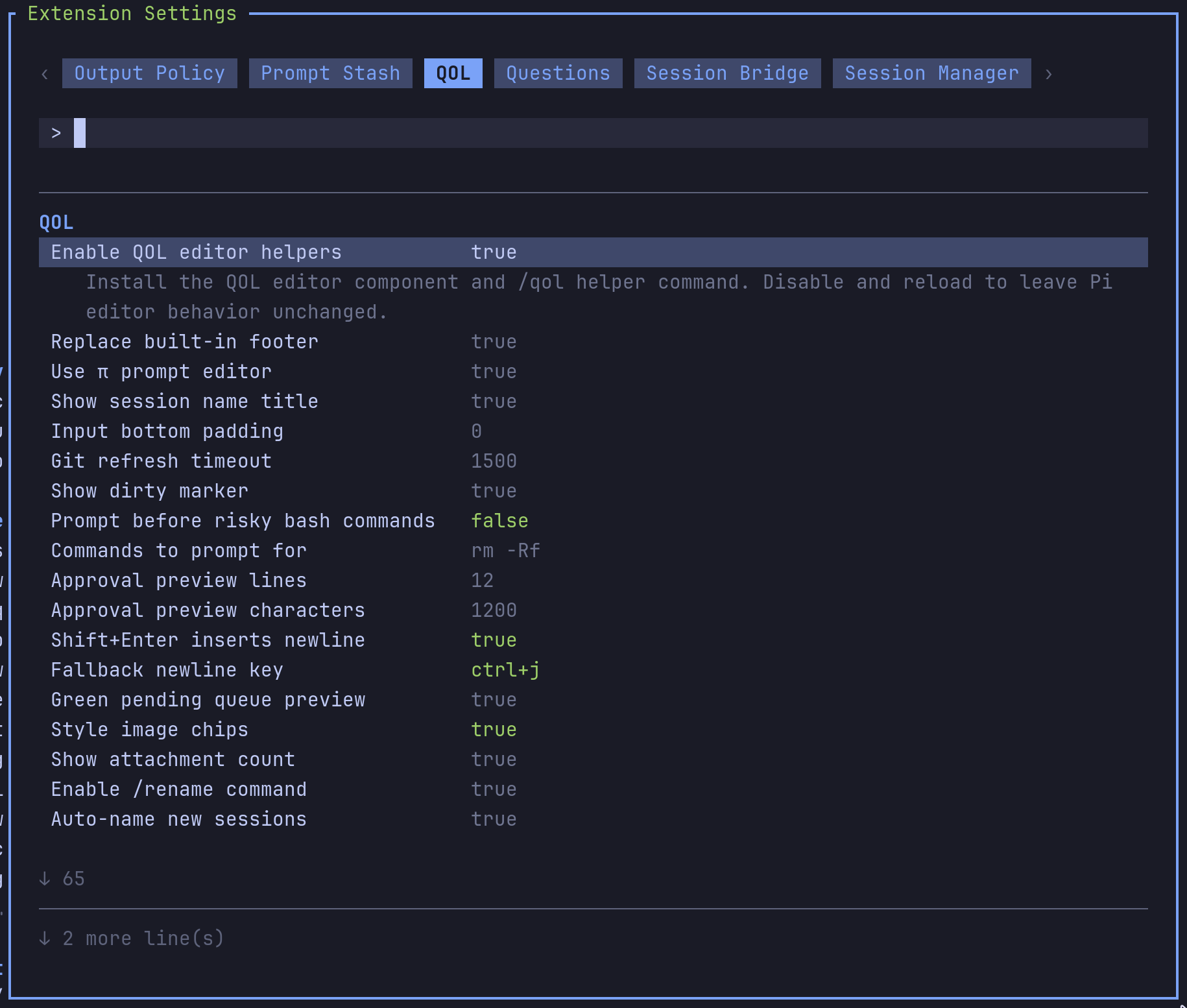
QOL extension settings panel

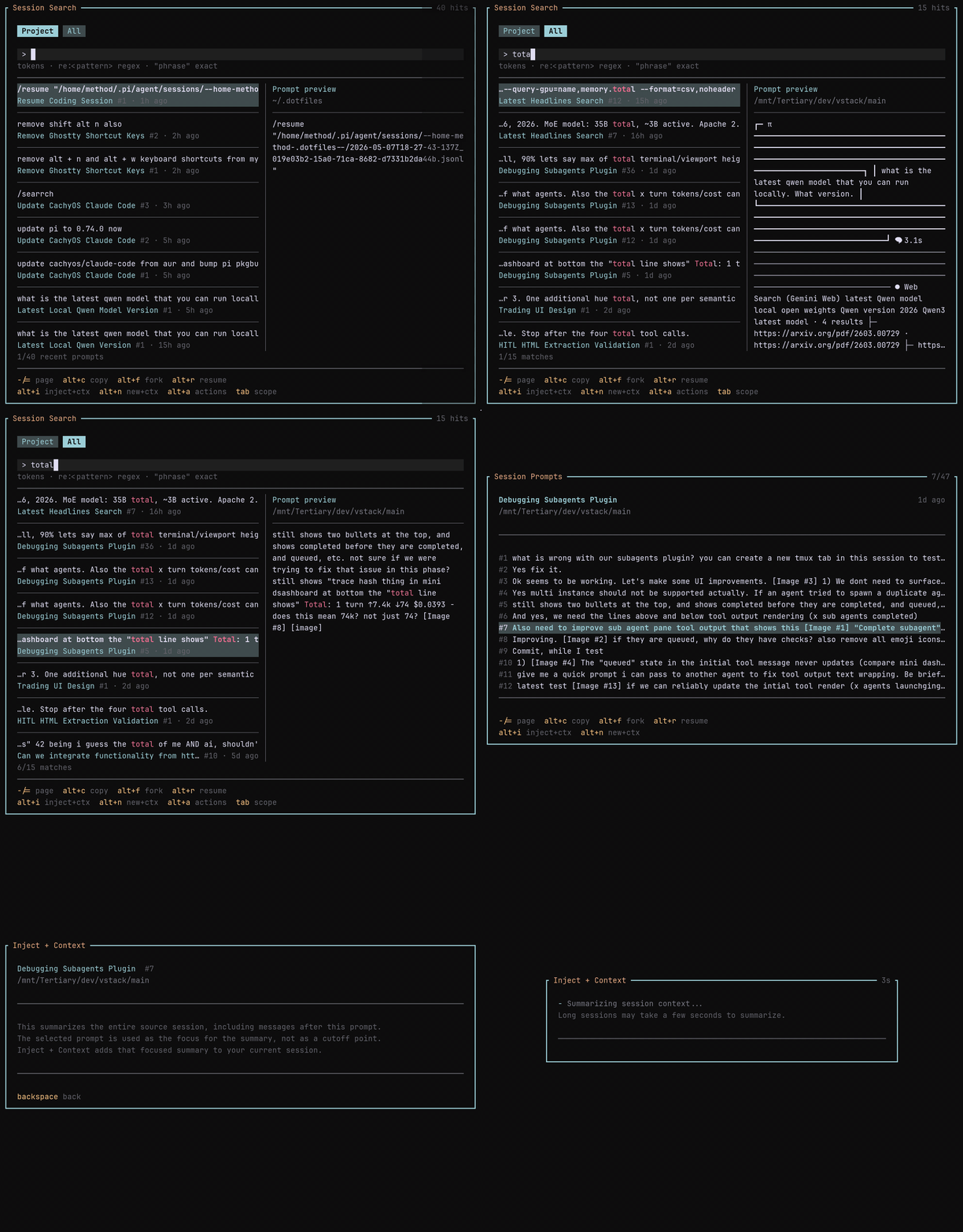
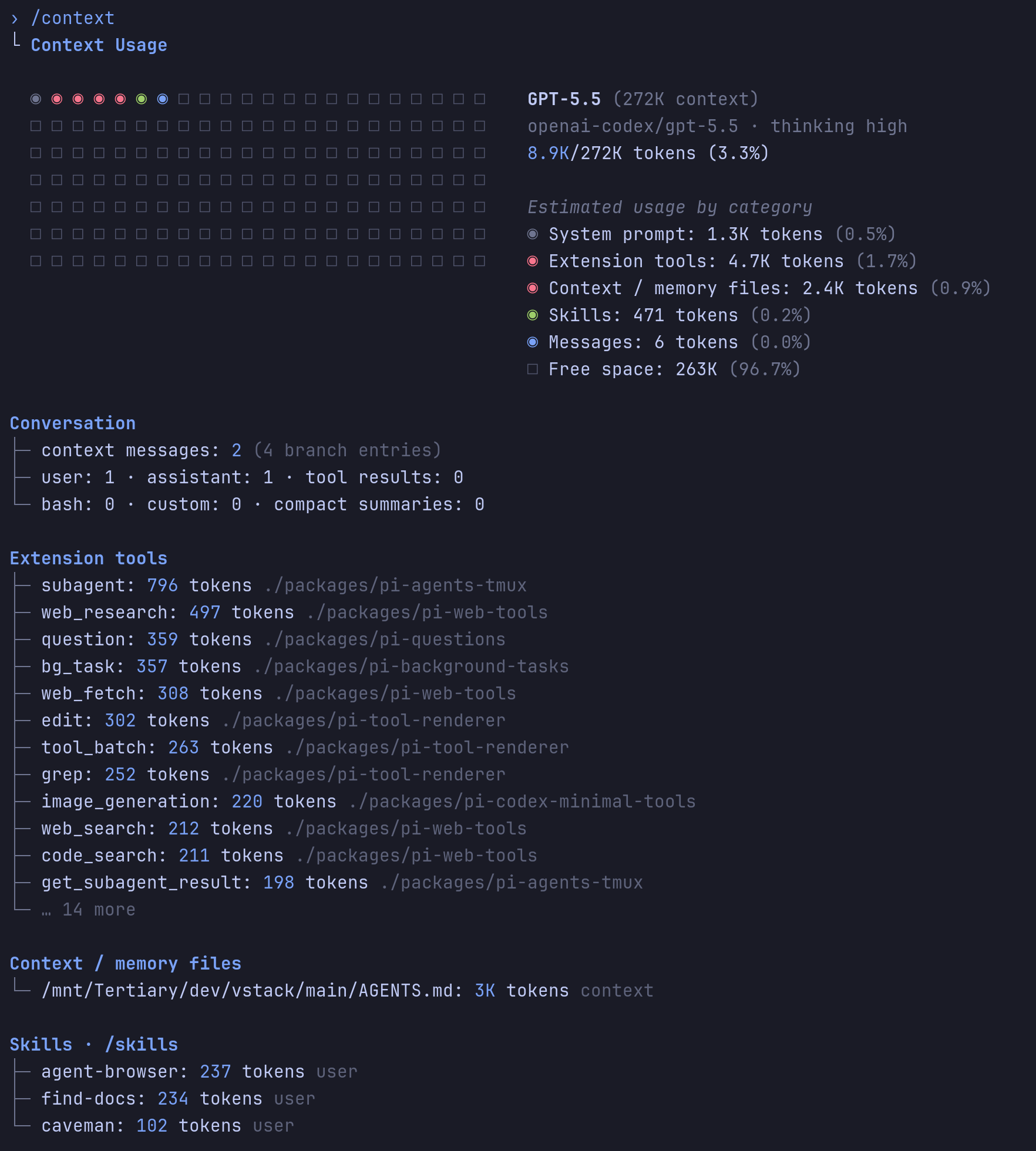
Session search popup /context usage breakdown

Quality-of-life extension for Pi: compact statusline, multiline input, session naming and search, scheduled prompts, notifications, and a permission gate.

Highlights

  • Compact statusline with repo, branch, model, thinking level, and context percent; can be disabled.
  • Newline-insert in the editor (multi-line drafts without auto-submit), with a fallback binding for terminals that can't distinguish the primary key.
  • Sessions auto-name from your first prompt. /rename overrides anytime.
  • /search browses previous sessions with snippet previews; the configured shortcut opens it instantly.
  • Session search reads prompt snippets line-by-line, so very large session JSONL files do not have to be materialized just to browse, search, or import context.
  • /context shows a Claude-style context-window breakdown.
  • /handoff <goal> drafts a focused prompt for a new session.
  • /schedule 20m <message> or /schedule 1h45m <message> sends a delayed prompt without invoking the model until the timer fires.
  • Optional rate-limit auto-resume sends a configurable continuation after reset.
  • Permission gate prompts before risky bash commands. Default match: rm -Rf.
  • Notifications for ready, questions, blocked states, and task completion.
  • Thinking timer next to collapsed Thinking... labels.
  • Caveman badge and a mode-cycling shortcut when pi-caveman is loaded.
  • Subagent-name badge in pi-agents-tmux child panes.

Install

Via npm:

pi install npm:@vanillagreen/pi-qol

Via vstack:

cargo install --git https://github.com/vanillagreencom/vstack.git vstack
vstack add vanillagreencom/vstack --pi-extension pi-qol --harness pi -y

Restart Pi after installation.

Commands

CommandAction
/qolOpen settings (or print status if extension-manager isn't installed).
/qol notify-testSend a test notification.
/rename [name]Set or show the current session's name.
/qol:renameRegenerate the session name from the first prompt.
/qol:rename:fullRegenerate from the full conversation.
/contextShow context-window usage with category breakdown.
/search [query]Open previous-session search.
/search:refreshRefresh the session search cache.
/handoff <goal>Draft a handoff prompt for a new session.
/schedule <delay> <message>Send a user message after a timer without invoking the model now. Example: /schedule 1h45m retry the previous request.

Arguments support autocomplete.

/schedule accepts ms, s, m, h, and d units; bare numbers mean minutes. Compact composite durations are accepted in largest-to-smallest order, like 1h45m, 45m10s, or 1h45m30s. Pending prompts render above the statusline like steering/follow-up previews until they are sent or cancelled. Manage pending prompts with /schedule list and /schedule cancel <id|all>. Schedules are stored in the Pi session and re-armed on reload/resume; if Pi is not running at the due time, an overdue prompt sends when that session is next loaded.

Settings

Open /extensions:settings; settings appear under the QOL tab. Names below match the labels shown there.

Project settings in .pi/settings.json apply only after Pi marks the workspace trusted; before trust, vstack Pi extensions read user/global settings only.

Glyph style: each package exposes glyphStyle (unicode default, ascii for terminal-safe chrome). @vanillagreen/pi-tool-renderer.globalGlyphStyleOverride=ascii forces ASCII chrome across vstack Pi extensions while leaving tool/model/user content unchanged.

Statusline

SettingWhat it does
Enable QOL editor helpersMaster toggle for QOL statusline, commands, notifications, search, compaction, and editor helpers.
Show compact statuslineRender or disable the QOL statusline row.
Replace built-in footerHide Pi's default footer while the QOL statusline is enabled.
Use π prompt editorUse the compact prompt editor.
Show session name titleShow the session name above the prompt and in the tmux pane title; refreshes as soon as Pi reports a session metadata change.
Sync session name to tmux window nameRename the tmux window to π <session>.
Input bottom paddingBlank lines below the prompt.
Show dirty markerAppend * to the branch when the worktree is dirty.

Input

SettingWhat it does
shift+enter inserts newlineInsert a newline instead of submitting.
Fallback newline keyAlternate binding for terminals that can't send the primary one.
Style pending queue previewHighlight Pi's pending-queue preview with a green left bar.
Style image chipsRender [Image #N] placeholders as distinct chips.
Show attachment countShow a status badge when the draft has image placeholders.

Session

SettingWhat it does
Enable /rename commandRegister the /rename command.
Enable /schedule commandRegister /schedule for timer-based prompts, useful for retrying after rate limits reset.
Auto-resume after rate limitsSend the configured continuation after a detected reset; cancels on newer turn.
Auto-name new sessionsGenerate a friendly session name from the first prompt.
Auto-rename modelModel used for title generation.
Auto-rename fallback modelModel tried when the primary fails.
Deterministic fallbackTitle-case words, truncated prompt, or none if all model calls fail.
Auto-rename prefixOptional static prefix on every generated name.
Notify on auto-renameShow a notification when auto-renaming.

Advanced: input cap, title length, output tokens, timeout, custom prompt template, and debug logging.

Handoff

SettingWhat it does
Enable /handoff commandRegister the /handoff command.
Review handoff promptOpen an editor to edit the generated prompt before creating the session.

Context window

SettingWhat it does
Enable /context commandRegister /context.

/context also estimates the serialized payload size of the messages that would be sent on the next request. When that payload crosses Transcript-risk warn budget (chars) a Transcript risk block appears below the compact buffer section even if token count is still under the context window — useful for catching large blob-shaped tool outputs that inflate the request long before token count alone would page anyone. If transcript-risk estimation itself errors, /context shows a sanitized error in the same block rather than silently hiding the warning.

Session search

SettingWhat it does
Enable session searchRegister /search and the overlay.
Session search shortcutConfigurable; set to none to disable.
Result limitMax matching prompts returned.
Visible session rowsRows shown before scrolling; defaults to 8.
Preview snippetsMatching snippets shown on the preview screen.
Session cache TTLSeconds before the session list refreshes; 0 keeps it until you run /search:refresh.

Summary settings (model, max tokens, input cap) tune the summarizer when you import context from a previous session.

Notifications

Master toggle: Enable notifications.

Triggers (notify when): ready, direction needed, question popups, all tasks complete, critical/blocked.

Channels: terminal bell, Mute bell sound, native terminal notifications (OSC 777/99 or Windows toast), tmux display-message, tmux window marking, OSC passthrough, and an optional in-Pi UI notice.

Tuning: cooldown seconds, title, ready message, body length, tmux durations.

Notes:

  • Terminal notification protocol picks between OSC 99 (Kitty) and OSC 777 automatically.
  • Bell when tmux window active is off so you don't get bells while looking at Pi.
  • Mute bell sound keeps notification routing enabled but suppresses QOL-emitted BEL bytes and uses ST terminators for OSC 777/99 where supported. Terminals or operating systems may still play their own sound for native notifications outside QOL control.
  • tmux native via client TTY sends OSC notifications to attached tmux clients so notifications still appear when the Pi window is inactive.

Use /qol notify-test to verify your terminal/tmux setup, including silent behavior with Mute bell sound enabled.

Permission gate

SettingWhat it does
Prompt before risky bash commandsAsk before bash commands matching the command list.
Commands to prompt forComma-separated literal fragments or /regex/flags.
Approval preview linesCap the approval-prompt preview height.
Approval preview charactersCap the approval-prompt preview width.

Off by default. When enabled, non-interactive matches are blocked.

Compaction

SettingWhat it does
Custom compaction summariesUse QOL summaries instead of Pi's default, with Pi-standard transient provider retries when available.
Compaction modelSummarizer model. Defaults to current, meaning Pi's active model; set a provider/model when you want a dedicated larger-context summarizer. Thinking suffixes through :max are accepted, and Pi-resolved header/environment authentication is forwarded.
Compaction detail profileconcise, balanced, or exhaustive.
Include previous summaryPass the previous summary for iterative continuity.
Fallback to Pi default compactionRun Pi's default compaction if QOL's fails.
Show compaction notificationsNotify on compaction start/fail/complete.
Custom branch summariesUse the QOL summarizer for /tree branch summaries.
Remote compaction endpointCall a remote HTTP summarizer instead of a model.
Idle compaction triggerAuto-compact after the session sits idle above a token threshold.

Idle thresholds (token threshold, idle delay, fixed token limit, percent limit) tune when idle compaction fires.

Long-session budget guard

For long autonomous runs the agent may not go idle, so idle compaction may never fire and the transcript can grow until provider/buffer limits hit. The budget guard runs on agent_end (not idle) and starts a compaction immediately when context usage crosses a percent of the model window or an absolute token limit. It fires once per threshold crossing — repeated agent_end events above the same threshold do not retrigger it, and the crossing key resets on a successful compaction or on a transient compaction failure (so the next agent_end retries).

SettingWhat it doesDefault
Long-session budget guardMaster toggle for the agent_end budget guard.on
Budget guard percentContext-window percentage that fires the guard. -1 disables percent-based firing.85
Budget guard token limitAbsolute tokens that fire the guard. -1 uses percent only.-1
Chunked compaction input capMax serialized characters per summarization request. Long transcripts are chunked, summarized chunk-by-chunk, then tree-reduced — every model/remote request (chunk + every reduce pass) is bounded so the compaction call itself cannot exceed provider buffer limits. 0 disables chunking.240000
Write pre-compaction handoff artifactBefore compaction, write ~/.pi/agent/vstack/sessions/<session>/pi-qol/handoff/<timestamp>.json plus a latest.json pointer containing previous summary, last task state, and referenced files/artifacts. Write failures surface as a QOL warning notification and a handoffArtifactError field in the compaction details.on
Transcript-risk warn budget (chars)/context shows a warning when the serialized payload of messages-to-send exceeds this many characters, even if tokens are still below the context window. 0 disables.600000

When the budget guard fires it injects a sentinel into the compaction request so the QOL bounded handler always runs — chunked summarizer + handoff artifact — even if Custom compaction summaries is off. Manual compactions (/tree, idle compaction, user-triggered) still only use the QOL handler when Custom compaction summaries is on; otherwise they fall through to Pi's default compaction with no handoff artifact and no chunking. If you want every compaction to use the QOL bounded path, turn Custom compaction summaries on.

While budget-guard compaction is running, QOL keeps a persistent status line above the prompt (and in the normal status footer when the compact statusline is disabled). After Pi prints the compacted-summary block, the line changes to QOL budget guard finalizing compaction… until ctx.compact() reports completion, so long reload/finalization gaps do not look frozen.

Recommended values for long autonomous runs:

  • Keep Long-session budget guard on. Lower Budget guard percent to 75 if your provider buffers are tight.
  • Optionally turn Custom compaction summaries on so user-initiated and idle compactions also use the QOL chunked summarizer + handoff artifact. (Budget-guard-triggered compactions always use them regardless of this setting.)
  • Lower Chunked compaction input cap to ~120000 when the summarizer model has a small context window.

Thinking

SettingWhat it does
Hidden thinking labelLabel shown when thinking blocks are hidden.
Show thinking timerShow elapsed time next to collapsed Thinking... labels.
Working indicator modeanimated ticks every 80ms; switch to static if you see flashes when the chat overflows.